However, it is important to remember that the spaces we call our own are private spaces – and even though sometimes it can feel like the pup brain has ran away with common sense, it is important to consider your fellow members to ensure your local event stays a safe space for everyone.
The rough guidelines here should be taken as a “general rule” for most spaces, and each event will have their own specific rules around where photos can be taken and when.
The Golden Rule: Remove non-consenting individuals

Our “Golden” rule would be, if you do take photos please do not just post them immediately online. Check the background of your photos first and ensure you have removed anyone who has not consented to be in the frame.
It’s easier than ever to remove non-consenting individuals from photos with many apps available for every operating system (free!). On iOS you can use the built-in Markup feature to draw over, or add a rectangle to cover an unwanted face. On Android to will depend upon your manufacturer if you have built-in tools available, or alternatively you can download PrivacyBlur from the Google App Store, or from F-Droid.
If you are using Telegram, when you share a photo you can have the option to open the image, choose “Markup” and then “Sticker” and place a sticker over any individuals you’d like to remove from the photo.
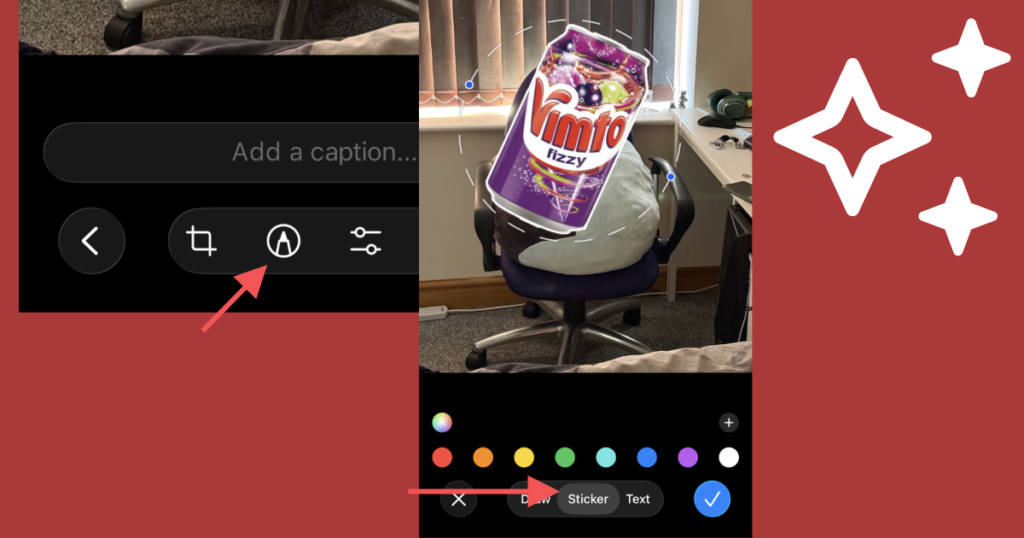
Taking this basic step and consideration really helps keep our community safe, and we really appreciate everyone who follows this quick 1 or 2 minute process (at maximum) before sharing online.
Follow your Event and Venue rules
Many events have their own rules such as strictly no photography allowed, or only by an authorised photographer as part of the event. This ensures that all photos that do come from the event can be distributed in a secure and privacy friendly manor, as well as everyone is able to ensure only those who wish to be made public are made public.
In general if you do not know what the rules are refrain from assuming you are ok to photograph without permission.
Event Organisers
If you are an event organiser, the safest rule is to ensure that authorised photographers have some form of visible name tag or lanyard saying who they are and they are a photographer for your event. And also ensure you post your event photos somewhere accessible to attendees. We really do not recommend options like Google Drive as it can associate things automatically to normie accounts.
It is incredibly difficult with smartphones to ensure pups are not tempted to snap a couple photos with friends, so we recommend dedicating a specific space to allow for photos to be taken. This can also be a feature at different times of the year with a small set-up for seasonal activities. If you want to go the extra mile, a photo booth area (i.e with a backdrop to automatically ensure nobody who isn’t wanting to be in a photo is included) with something like Pibooth which can auto-post photos to a Telegram chat can be a fun addition.
If your event is able to afford to do so, having a roller banner with your rules on is always recommended to remind everyone as they arrive of your rules to keep your community safe.
Google Drive and Pet Play
We really do not recommend Google Drive for anything pet play related. The main reason being is Google has a handy featured called “Shared with Me” – however it is flawed.
Shared links automatically appear in here immediately on the signed-in Google account you have open.
This can be a work account, a school/college account, or simply a non-pup or pet related account you may not want to have anything connected with. For example you may not realise until someone who does not know about your pet side is sat next to you and you click “Shared with Me” and Google has just outed you without your consent.
The worst part about this is removing the links from your account, in our experience at Tailspace, either does not display options, or simply doesn’t work and returns upon refreshing the screen.
If you do see Google Drive links, we always recommend opening in a private browsing link and using them in this way. Other alternatives exist such as Zoho WorkDrive, Proton Drive or even sharing photos on a Telegram group which do not do this weird behaviour.